
Wi-Fi and networking
Give every camera, speaker, and smart device a network that reaches it and keeps it connected.
What you can expect
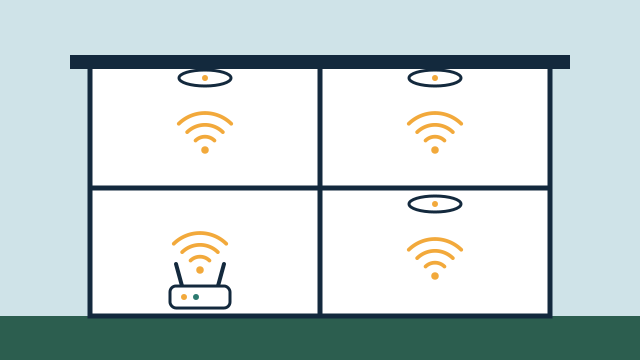
- Wi-Fi coverage where devices actually sit, including patios, garages, and back offices.
- Fewer devices dropping offline and fewer apps showing a device as unavailable.
- Smart devices, guests, and personal computers kept on separate networks where the equipment supports it.
- A documented network that someone else can understand later.
Where it fits
In homes
- Extending reliable Wi-Fi to a pool deck, dock, or detached garage.
- Replacing a single internet provider router with access points placed for the whole house.
- A separate guest network for visitors and short-term renters.
In businesses
- Separate networks for staff, guests, and building devices such as cameras and thermostats.
- Wired connections for fixed equipment like displays, recorders, and point-of-sale stations.
- Coverage planning for an office, shop, or restaurant with several rooms or floors.
Why the network matters for automation
Almost every smart device depends on the network to report status, receive commands, or reach its app. When Wi-Fi is weak or overloaded, automation looks unreliable even when the devices are fine: lights respond late, cameras drop offline, and speakers stutter. Networking and technical support are SwayPC’s background, so we treat the network as part of every automation project rather than an afterthought.
What an assessment looks like
We walk the property with the floor plan in mind and measure signal where devices actually live: the front door camera, the garage, the pool equipment pad, the conference room. We check the internet provider’s equipment, any routers or mesh units you added, existing cabling, and how many devices are connected. We also look for channel interference from neighboring networks, which is common in condo towers and dense blocks.
The result is a plain explanation of what limits your network now and a proposal ranked by what will help most. Often the first steps are configuration changes and better placement of equipment you already own.
Wi-Fi and the other wireless networks in a smart property
Wi-Fi is only one of the networks a smart property may use. Many sensors, locks, and switches use low-power mesh protocols such as Zigbee, Z-Wave, or Thread. These do not run on your Wi-Fi; they need a hub, bridge, or Thread border router that connects them to the rest of the system. Matter, a standard for smart home device compatibility, can work over Wi-Fi, Thread, or Ethernet. When devices misbehave, we check which network each one uses, because the fix differs.
Many inexpensive smart devices connect only to 2.4 GHz Wi-Fi. That band reaches farther but is more crowded, so we plan settings that keep those devices connected without slowing down laptops and TVs.
Separating devices, guests, and work
Where the equipment supports it, we place smart devices, guests, and personal or business computers on separate networks. This limits what a compromised device or a visitor’s laptop can reach and keeps guest traffic away from cameras and recorders. Separation needs care, since some automation features rely on devices finding each other on the same network.
Florida conditions and outages
Concrete block construction, which is common in South Florida, absorbs Wi-Fi more than wood framing, and a single router rarely covers a large home from one corner. Wired access points or wireless links help reach patios and detached spaces. Network equipment in hot garages or closets also benefits from ventilation.
During a power outage, a battery backup on the router and switches can keep the local network running for a while, which helps local automations continue if devices still have power. Remote access still depends on the internet provider. Our article on local control versus cloud automation explains what keeps working.
Illustrative example: A small Hollywood office has a provider router in a back closet, a Wi-Fi extender, and two cameras that drop offline every afternoon. In this example, two ceiling access points are cabled in, the extender is removed, the cameras and thermostats move to their own network, and the provider router is kept as the gateway. Visitors use a separate guest network.
Getting started
Tell us where devices struggle through the free consultation. We’ll contact you as soon as possible and send a proposal that explains what limits your network today and the changes that would help.
Scope and planning
What it depends on
- An active internet service; we work with the connection you have and don't replace your provider.
- Access to the internet provider's modem or router and its admin settings.
- Power and a location for network equipment, ideally in a ventilated spot.
- Permission for cabling routes where a condo association or landlord requires it.
Limitations to know
- We can improve coverage and stability inside the property, but internet speed and outages depend on your provider.
- Concrete block walls, metal, and some window coatings can limit how far Wi-Fi travels between rooms.
- Network separation reduces exposure but does not make any network fully secure.
- Some older smart devices only work on 2.4 GHz Wi-Fi or with settings that need to be kept for them.
What affects the cost
- Size and layout of the property, including outdoor areas and separate buildings.
- Whether cable can be run to access point locations or wireless links are needed.
- Reusing existing network equipment versus adding access points, switches, or a router.
- Number of separate networks and devices to organize.
- Battery backup for network equipment, if requested.
Every project is quoted individually after the free consultation. There's no minimum project size, and travel is included in the quote.
Questions people ask
Do I need a better internet plan or a better network?
Often the Wi-Fi inside the property is the bottleneck, not the internet plan. We test both and tell you which one is limiting your devices before recommending changes.
Is a mesh Wi-Fi kit enough?
For some homes it works well. Mesh systems perform best when the units connect by cable or sit within good range of each other. In larger or concrete-heavy properties, wired access points are often more stable.
Can you work with the equipment I already bought?
Yes, we start there. If your router or mesh system can do what the property needs, we configure it; if not, we explain the gap before suggesting replacements.
Related services
Related reading
- Why networking matters for automation: coverage, wiring, and reliability
Why Wi-Fi coverage, wired backhaul, 2.4 GHz device support, separate smart-device networks, and backup power decide how dependable your automation feels. -
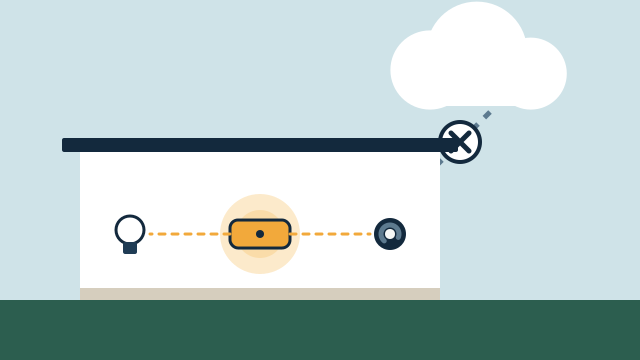 Local control vs. cloud automation: what keeps working, and why it matters
How local and cloud-connected automation differ during internet and power outages, vendor changes, and remote access, and which functions should run locally. -
 Condo and retrofit automation: working within building rules
How to automate a condo or older home without new wiring: association approvals, building network limits, battery devices, shades, locks, and fan coil thermostats.
Tell us about your property
Answer a few short questions and the SwayPC team will contact you to arrange your free consultation and proposal. There's no minimum project size, and travel is included in every quote.